
Ask your own car

Your car answers, if you ask it properly

Plug in an ELM327 adapter, pair your phone, and see what the engine is saying — in live numbers and in plain language.
iOS TestFlight and Android internal testing

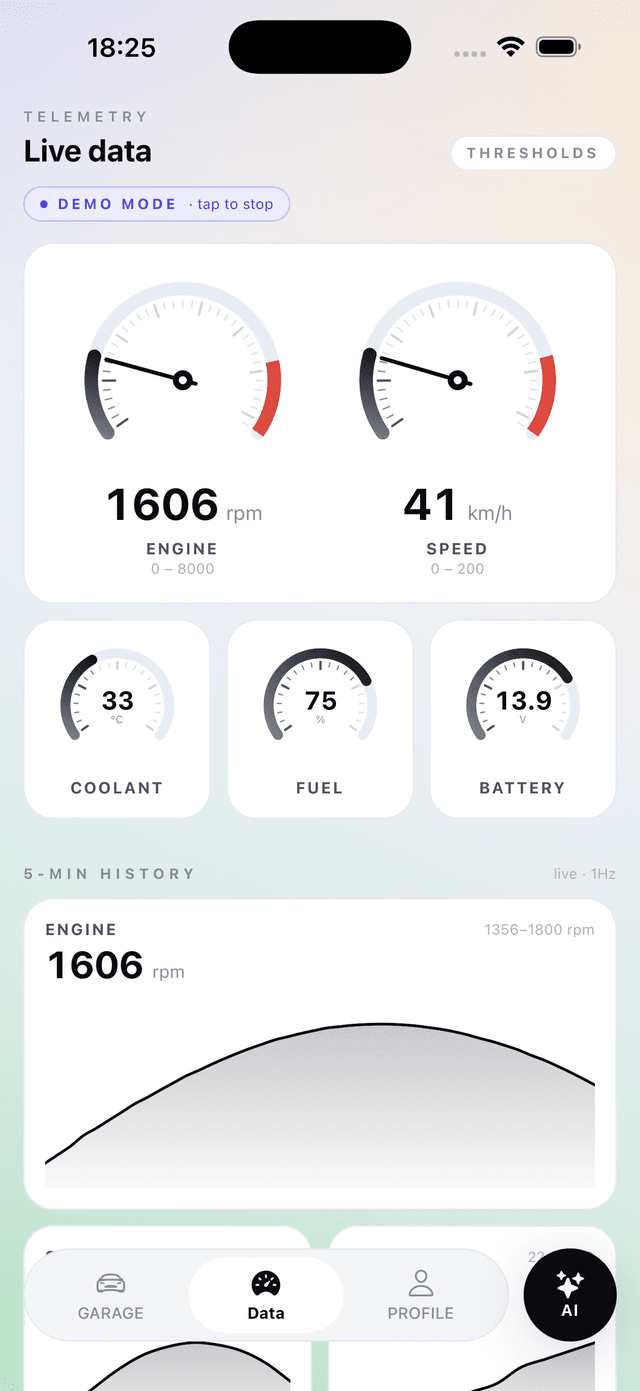
Live data

The app pairs with an ELM327 adapter over Bluetooth, reads live readings and fault codes straight from the ECU, and hands those same numbers to the AI assistant.

Live data, an answer you can act on

Features

  • Live data

    RPM, speed, coolant, fuel and voltage — once a second, with a five-minute history.

    Live data
  • AI assistant

    It pulls the sensor readings from the adapter itself when you ask, then answers.

    OBD assistant
  • Fault codes

    Stored, pending and permanent codes — each one with a plain description.

    Trouble codes

How it works

Four steps from the port to an answer

The phone holds the link to the adapter itself — no laptop in the middle and no companion program to install.

  1. Plug in the adapter

    01

    The OBD-II port is almost always under the steering wheel. Plug in and turn the ignition on.

  2. Pair your phone

    02

    BLE, Bluetooth Classic (Android) or WiFi — pick whichever your adapter speaks.

  3. Read the car

    03

    Live values appear on the dashboard and the ECU memory appears on the codes screen.

  4. Ask the assistant

    04

    Type the question in ordinary words. The answer is built on your numbers.

OBD assistant

Trouble codes

A code names the symptom, not the part to replace

The ECU runs self-tests while you drive. When one fails it stores a code and usually lights the check-engine lamp.

Clearing is not repairing

Erasing codes wipes the ECU memory and resets its readiness monitors. The fault returns as soon as the ECU sees it again.

P0301

Stored

A confirmed fault — the ECU saw it often enough to be sure.

P0420

Pending

Seen once, not yet confirmed. It becomes stored if it happens again.

P0171

Permanent

Cannot be erased with a scan tool. It clears only after the ECU’s own tests pass.

What the letters mean

P is powertrain, B body, C chassis, U network. P0xxx and P2xxx mean the same on every make; P1xxx differs per manufacturer.

Frequently asked

Before you start

What adapter do I need?

Any ELM327-compatible OBD-II adapter. The app works with Bluetooth Low Energy, Bluetooth Classic (Android only) and WiFi adapters — including the cheap clones that are by far the most common.

Is my car compatible?

If it has a 16-pin OBD-II port near the steering wheel, almost certainly yes. EOBD has been mandatory in Europe since 2001 for petrol and 2004 for diesel, and OBD-II in the United States since 1996.

Does it need an internet connection?

Not to read live values or fault codes — that all happens between the adapter and your phone. A connection is only needed for the AI assistant to answer and for sessions to sync.

Can it clear fault codes?

Yes, but only after you confirm it separately. The app also warns you that clearing does not fix the fault — it only wipes the ECU memory.

Does it work on iPhone?

Yes, with BLE and WiFi adapters. Bluetooth Classic adapters are not supported on iOS — that is a platform restriction, not an app one.

Can I try it without an adapter?

Yes. Demo mode runs a simulated adapter, so the dashboard, charts and assistant all work — the readings are test data and the app says so plainly.

What languages does the assistant answer in?

Georgian and English. Your language preference is sent with every request, so the interface and the assistant always speak the same one.

Ready?

Download the app

Plug in the adapter and ask. Next time the check-engine light comes on, you will not have to guess whether it is serious.

Send us a note and we will add you to the next testing wave.

Live data

Privacy